Home Blog Page 164

How to Set Up a Green Screen Face-Cam

Ready to up your game stream presentation? Want to place yourself into the picture, but not in a box? Get your green screen on.

Though the debate over whether or not it should be done goes on, with strong supporters on either side, the opportunity to green screen your reaction shots into your video is a popular trend among gamers who record or live stream their gameplay. Achieving this effect is not entirely difficult, but just look around at these live streams and what becomes immediately apparent is that the actual hard part is getting it to look good. Your success or failure will come down to your equipment, your investment and your attention to detail.

Choosing a Screen

The effect is achieved when the software looks for a specific color — usually green — and removes it. In its place is displayed whatever video background you place behind it, in this case your game. If anything in front of your screen is also green, it too will disappear. Likewise, anything not your chosen color will remain.

To achieve the right effect, you’ll need a screen that is two to three times larger than the dimensions of your foreground. If you’re sitting down and all you want to ever project is your head and shoulders, you’ll need a screen that is about four to five feet wide. If you’re going to show your whole body head to toe, you’ll need something significantly larger.

Full body appropriate kits can be found for about $115. They should provide all you need to setup a consistent wash of mid-range green from an optimized cotton fabric. If you have lights and just need the green, consider a pop-up screen as it comes with its own framework. These are usually smaller, but would work for most gamers. If you still can’t afford that, you can certainly kitbash something on the cheap. A medium green slightly fuzzy cotton blanket, or even cardboard painted green, can be all that you need to get started. You’ll want a dull matte surface, not shiny or reflective.

Mount the green behind your performance area on a stable frame. It should be stretched tight so it doesn’t move, and so there are no wrinkles whatsoever. Shadows and loose fabric mean variation in color; that’s bad.

Controlling Light and Spill

The ultimate quality of your effect comes down to one key element: lighting. After you have your green screen in place, your next step is to light the backdrop as evenly as possible. To begin, try placing lights at 45-degree angles to your screen. Hotspots can destroy the effect as easily as a shadow, so you’ll need soft, diffuse light, as from Chinese lanterns or photo umbrellas. You’ll never achieve what you need with a naked bulb. Constantly check your lighting in your camera, as it will see things differently than your eyes do. What you’re ultimately looking for is a light that makes the surface lightly glow in a sort of neon effect.

Proper placement of your lights and green screen will be vital in making a clean key easy to pull.

Now the green light is being sent from your screen to the camera in a nice even wash. Unfortunately, it also means green light is heading towards your foreground object — you. To compensate, place your screen far enough back that only a minimal amount of this light hits the foreground. If the green light is too bright, it will spill on to you and ruin the effect. Remember, too, that this light may even travel past you and bounce off the wall in front of you, tinting you yet again from the front. Increasing distance between foreground and background will alleviate all these issues.

Next, you’ll want to light your foreground including yourself and your chair, if it has a high back. This should be a white light with the average intensity being about the same as your green screen. Light from 45-degree angles and do your best to not let any of it hit the screen behind you.

One final issue is your monitor screen itself. If it projects green onto you, your effect will diminish yet again. Lowering brightness, angling the monitor and shooting your facecam off-axis to the monitor can help eliminate issues.

Pulling the Key

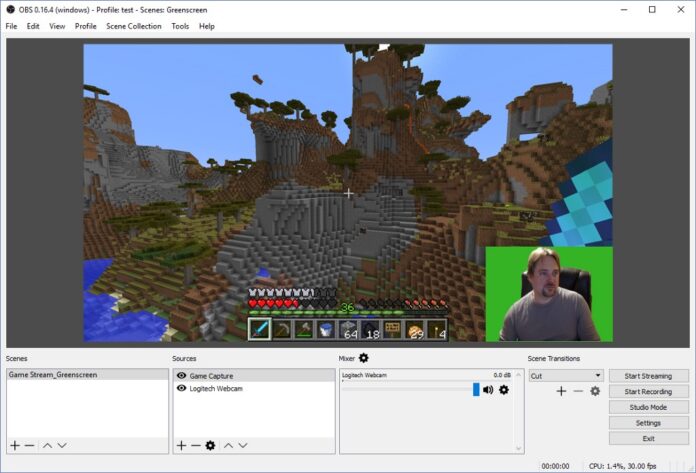
If you’ve done your setup with care the final step will be a lot easier. Open Broadcaster Software (OBS) and other streaming programs include the system you need to create your color key. You’ll find the names are always different from program to program, but the method is generally the same. You’ll choose the value of the middle green on your screen and then adjust the rest of the sliders in turn to adjust how much lighter and darker green to include, and the overall tolerance of near-green colors.

If you’re having issues, go back and tweak your lighting.

Enthusiast and professional edit systems like Camtasia, Pinnacle, Movie Studio or Premiere Pro have excellent tools for key effects. As a general rule, the higher on the list a setting is, the more likely it is that you should adjust it first. Beware of the simpler systems, however, which have limited options or no adjustments at all. You’ll almost never achieve a quality result without some level of control.

If you’re having issues, go back and tweak your lighting. You’ll also notice that a high-quality webcam will make a big difference. Logitech’s C920 is a great web camera for green screen, and their C922 even comes with a limited subscription for Xsplit. If you understand how the system works and what it needs, your green screen will not only produce professional results; it will be a breeze to operate.

YouTuber Magazine is a digital periodical. Subscribe here to have the next full issue delivered for free.
kampungbet

situs bola

situs gacor

slot gacor hari ini

link gacor

toto slot

situs gacor

situs slot

situs toto

toto togel/a>

toto togel

situs gacor

situs gacor

situs gacor

situs gacor

link gacor

situs gacor

situs gacor

situs gacor

situs bola

slot gacor/a>

6 of the best free video editing software

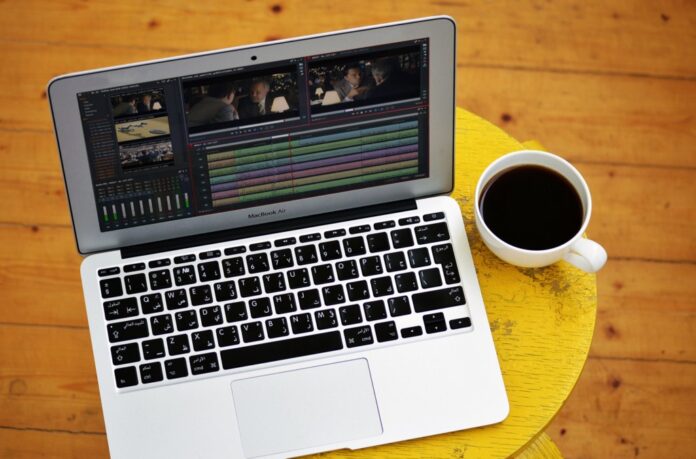
Choosing video editing software can be challenging, and most creators will agree with that. Some tend to think that a well-known brand or high price guarantee the best results, but that’s not exactly so. Indeed, there are dozens of free video editing programs with feature sets so advanced that they leave the expensive ones far behind. And that is what a new YouTube creator should be looking for.

Here’s a piece of advice: When choosing video editing software, don’t look for the best one — look for the right one. Each program has something special to offer, so you need to figure out whether that something helps achieve your goals. Whether you stick to the list below or decide to continue searching on your own, we recommend you to keep the following characteristics in mind.

First, supported formats. You might use a professional camera or you might decide to shoot videos with an iPhone and a selfie stick — that’s your choice. What you might not want is to be forced to convert your videos to the required format each time before editing, so make sure your videos can be effortlessly opened in the chosen program.

Second, features available. Will you benefit from numerous visual effects or avoid them entirely? Are you planning to use screen capture or chrome key? Will your videos need color correction or voice over? Don’t be misled by an endless list of features — they might all be useless if the right one isn’t there.

Third, video export options. As a creator, you should be able to save your project in formats supported by YouTube: .MOV, .MPEG4, MP4, .AVI, .WMV, .MPEGPS, .FLV, 3GPP or WebM. H.264 codec is considered a current de facto standard for videos uploaded on the web — see if the program has it on the list.

Finally, check software limitations in advance. Some free editing programs put watermarks on videos, disable certain formats for export or restrict exporting all together. It can be an unpleasant surprise after hours of working, so make sure to read the fine print before starting a project.

Sounds a bit overwhelming? We’ve got you covered. Take a look at a brief overview of some great video editing programs below. Not only do they have comprehensive functionality, but they are also available at zero cost.

Lightworks

(Windows, Mac and Linux)

Lightworks has been on the market for 20+ years, and it’s the only multiplatform video editor at this level available for all three major operating systems. In the words of the developers, the program is compatible with “almost every format you can think of,” including ProRes, Avid DNxHD, AVC-Intra, DVCPRO HD, RED R3D, DPX, AVCHD and HD 422.

The free version of Lightworks allows you to play with titles, perform multicam editing and apply more than 100 built-in presets to improve the way your video looks. Yet its strongest side is not a set of transitions and visual effects, but a superior trimming feature designed to be fast and simple. That’s why, according to the website, Lightworks was chosen for such Hollywood movies production as “The King’s Speech,” “Bruce Almighty,” “The Wolf of Wall Street” and others.

Export options: Lightworks archives, YouTube, Vimeo
Pros: Clean interface, spectacular ultra-precise trimming
Cons: Export options in Lightworks free version are limited to YouTube and Vimeo. That means you can only upload your project from timeline directly to a web account.

VSDC

(Windows)

VSDC has been on the market for six years and deserves its reputation as a comprehensive all-in-one tool because of its rich feature set. Full format compatibility is the key advantage here, and unlike most free video editors, VSDC does not limit export options. In other words, it reads all the video formats and allows you to save in any of them as well. You can even export your project in H.265 codec for better compression qulaity.

Despite an old-school website design, VSDC is clearly up to date with the latest video editing trends. Among its features you’ll find numerous visual effects, a masking tool, Chroma Key and blending modes. As a YouTube creator, you might also make use of built-in screen capture and numerous ways to work with text and subtitles.

Export options: AVI, DVD, VCD/SVCD, MPEG, MP4, M4V, MOV, 3GP/3G2, WMV, MKV, RM/RMVB, FLV, SWF, AMV, MTV
Pros: VSDC has an impressive feature set and full format compatibility. The free version has no limitations.
Cons: The software interface will not be intuitive for someone who is switching from linear programs like Movie Maker. It might take some time and effort before you’ll be able to turn on your video editing conveyer machine.

DaVinci Resolve 12.5

(Mac and Windows)

When it comes to color correction and grading, DaVinci Resolve is a game changer. If you tend to be a perfectionist about image quality, you won’t find anything better. There is a tiny difference between the free and the paid version of DaVinci ($995), as the latter is aimed at filmmaking professionals and includes such features as noise reduction and 3D stereoscopic editing.
DaVinci Resolve allows you to perform multiple video editing procedures, such as trimming, applying transition effects or waveform audio editing. With OpenFX plug-in support, you can set up video filters according to your needs. Users love this software for its incredible color palette and automatic Shot Match tool, but using DaVinci for simple edits is probably like using a steam hammer for cracking nuts.

Export options: AVI, QuickTime, MP4, MOV, APNG
Pros: Unparalleled color correction
Cons: High system requirements: at least 4GB of graphics RAM. Also, you might encounter issues trying to import certain file types. Davinci’s preferable format to work with is ProRes, so conversion is highly recommended before starting.

HitFilm 4 Express

(Mac and Windows)

HitFilm is initially positioned as a video editor for independent movie makers, though lately it has become quite popular among Youtuber creators as well. This program is all about unleashing your creativity and letting your imagination fly. HitFilm focuses on visual effects — you’ll find over 140 of them including shake, rain, blood spray, explosion and procedural fire — but what makes it unique is 2D and 3D compositing tools that can easily compete with the ones in Adobe After Effects.

HitFilm 4 Express includes standard titling tools, color grading, a Chroma Key feature and audio editing. It is compatible with Quicktime, AVI, MOV, MP4, MPEG-1, MXF, DV, HDV and WMV.

Export options: QuickTime, MP4, AVI, YouTube direct upload
Pros: HitFilm 4 Express has a feature set for basic video editing and very few system requirements.
Cons: Some essential features are only available with a subscription, which makes the idea of HitFilm 4 Express free version inconsistent.

OpenShot

(OpenSource Linux. Windows and Mac installers in Beta)

As with most open source projects, OpenShot video editor has a supportive fast growing community and frequent updates. It works with all the formats supported by FFmpeg, for example, WebM, AVSHD, HEVC and popular audio codecs.

At a glance, the Openshot feature set does not look too outstanding in comparison with some previously mentioned products. You get a non-linear video editor with trimming, resizing, scaling and rotation features. You get multiple color Chroma Key, transition effects, audio editor and multiple tools for titling. Yet the “open source” tag is what makes this option special. For instance, due to FFmpeg support, you can customize output formats and create your own combination of bitrate, formats and codecs.

Export options: Simple mode: web-ready formats for YouTube and Vimeo, Advanced mode: customizable
Pros: The only high-end open source video editor.
Cons: According to user feedback, Openshot might be unstable and crash periodically.

VideoPad

(Windows and Mac)

If all you’re looking for in a video editor is being able to quickly cut out fragments, VideoPad might be suitable for your needs. This video editor is simplistic and feature-limited. However, it does what it says.
There are around 50 visual effects, Chroma Key, text overlay, basic audio editor and shaky footage stabilizer. You can also create voiceovers and add subtitles to your video. The free version’s interface is clean and will look familiar to those who’ve used Movie Maker before. The advantage of having a paid version of VideoPad is an ability to edit multiple video tracks simultaneously and use external plug-ins.

Export options: AVI, WMV, MPG, 3GP, MP4, MOV, direct upload to Youtube, Flickr or Facebook
Pros: Immediate installation, clean interface, drag’n’drop editing
Cons: Lack of documentation and support. Exported video seem to have minor quality loss, probably not visible on small screens.

Now that you have this list with all the shortcomings pointed out, we hope you’ll be able to pick one that suits your video editing needs and style.

YouTuber Magazine is a digital periodical. Subscribe here to have the next full issue delivered for free.

kampungbet

situs bola

situs gacor

slot gacor hari ini

link gacor

toto slot

situs gacor

situs slot

situs toto

toto togel/a>

toto togel

situs gacor

situs gacor

situs gacor

situs gacor

link gacor

situs gacor

situs gacor

situs gacor

situs bola

slot gacor/a>

How to Take Product Shots that Sizzle

Product reviews and unboxing have become big business all over YouTube. Here’s how to make your video stand out with amazing product B-roll.

Now that online video has surpassed all other modes of showcasing product, the internet is bursting with advice columns for DIY content creators on how to improve the production values of their videos. We surveyed the digital landscape to save you some click time.

Shooting Space

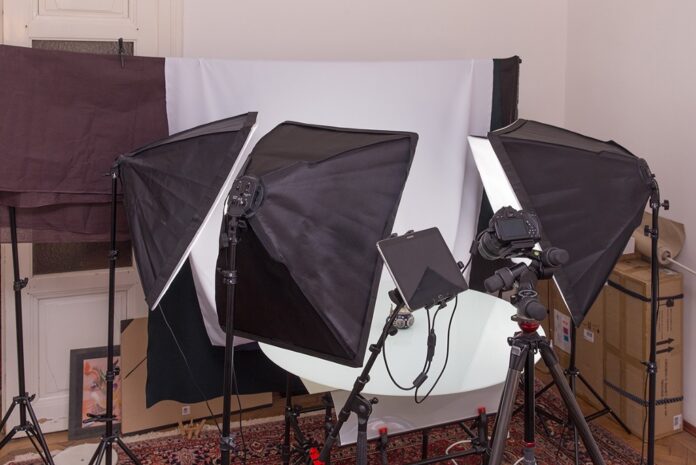
If you haven’t yet graduated to a professional studio facility, you can still capture high-quality visuals if you can make room for a controlled space in your basement or your garage to set up a dedicated shooting area. A folding table, some white mat board mounted in a sweep, or curve, for a seamless backdrop, perhaps a turntable for your product and a basic light kit will get you started shooting professional looking video of your widgets.

Creating a designated space for shooting B-roll will make your shots look more professional. This DIY lightbox is perfect for small products.

Lighting

You want your product to pop out the frame and dazzle. To do that you’ll want to put it in the best light, as it were. Lighting is the most important element in product shooting. What you don’t want is distracting highlights kicking off the product too harshly. And you want to avoid that amateurish look of multiple, hard shadows cast in all directions.

The best lighting for product illumination is indirect or soft light. Have at least one umbrella in your light kit. Bouncing a light source off the umbrella directed at the product produces a pleasing soft light as well as soft shadows. Soft boxes are a pricier but more effective lighting solution to achieve this. Bouncing light off foam core or white reflector cards mounted out of the camera’s view has a similar softening effect of light and shadow.

For optimal shadow placement, move the main light source around the object and watch where the shadow falls until you’ve got the look you want. Shadow placement gives you a sense of shape of the displayed object. Lighting from the side shows off details and texture. For dramatic shadow placement to create mood, use a single light fixture and place it to one side or about 45 degrees to the rear of the product.

If you want no shadows, raise the lights so that the shadows fall to the table or out of frame. If your background is something other than white, a rim light mounted high behind the object and flagged off to prevent light spilling onto the background will ensure crisp separation of widget from background.

In product video shooting, the basic lighting objectives of visibility, texture, shape, detail and accuracy of colors are particularly important. Most products are either cylindrical or cube shaped. To light these shapes, most of the time you will be using a variation of a three point lighting set-up. Set the white balance on your camera manually for best color results.

Depth of Field

You can control how much of the main attraction you want in focus by setting your aperture or f-stop accordingly. The aperture is the adjustable opening behind the lens that controls how much light it transmits. The smaller the opening — large f-stop number — the sharper the focus.

Using cinematic shallow depth of field provides a dramatic look and can help direct your audience’s attention to specific details.

With a large aperture — small f-stop number — the focus will be critical since the depth of field will be shallow or narrow. This can be a nice look when shooting extreme close-ups of electronic gagetry or jewelry, for example.

To highlight a particular element of a product, manually focus on the featured area with the aperture wide open. The shallow depth of field will render other parts of the object and the background in soft focus.

Another cinematic convention for achieving sharp foregrounds and soft backgrounds is to shoot from a distance. Shooting on a long lens, zooming in and focusing on the product produces a classic selective focus effect.

A smaller aperture produces a look where all planes, foreground, middle and background, are in focus. Heads-up: this huge depth of field, aka the “Citizen Kane” look, needs a lot of light since it requires you to bring the aperture down and restrict the light that makes it to your camera’s sensor.

The opposite will be true for shots with shallower depth of field and larger aperture openings, so you may need to compensate for the extra light in those shots to achieve proper exposure. If your camera has a neutral density filter, switch it on. You can also mount an ND filter on the front of the lens to achieve good exposure at the stop of f/2.8 or lower needed to produce the focus effect you want.

Placing the product on a turntable is an easy way to add motion to your shot for more dynamic results.

Motion

Whether it’s moving the camera or moving the object, motion spices up any shot. Achieving motion for video is not as complicated and expensive as it used to be. Motorized turntables, available for under a hundred dollars at camera stores, allow you to move the product itself to create a variety of looks.

For a super dynamic effect, frame the product on the turntable in a close-up and slowly tilt or pan your camera against the rotation of the product. The result can be stunning as featured elements of the product move subtly in and out of focus as they travel across the frame without you having to touch the focus ring. There is a wide range of affordable aluminum rail and other motion control products on the market that can put the motion in your motion pictures and make your widget stand out from the rest.

Bringing It All Together

Combine these elements and you’ll have all the tools needed to create great-looking B-roll. Experiment with different setups to find the best one for the particular products you want to showcase and instantly up the production value in all of your future videos.

YouTuber Magazine is a digital periodical. Subscribe here to have the next full issue delivered for free.

kampungbet

situs bola

situs gacor

slot gacor hari ini

link gacor

toto slot

situs gacor

situs slot

situs toto

toto togel/a>

toto togel

situs gacor

situs gacor

situs gacor

situs gacor

link gacor

situs gacor

situs gacor

situs gacor

situs bola

slot gacor/a>

5 Reasons the Canon EOS 80D is Made For Vloggers

This post is brought to you by Canon and the EOS 80D. Learn more at Canon.com.

Vlogging is a popular way to take an idea and turn it into a video on whatever topic a person desires. The one drawback has been the need to be able to shoot the video outside of those situations where subjects and lighting can be controlled, such as in a studio.

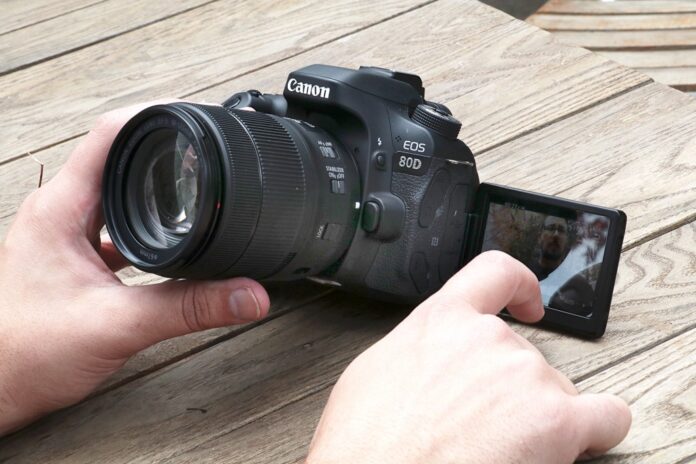
The Canon EOS 80D camera possesses an Intelligent Viewfinder with approximately 100% coverage so as to provide for a clear view while taking superlative still photos and shooting Full HD video at 60fps. It is well suited for vlogging, and here are the five reasons why.

1. Focus

A moving subject requires that a camera’s autofocus is able to keep up with their movements and make adjustments “on the fly” as necessary, for example, keeping focus on a person in a crowd or wherever the subject is not stationary. The EOS 80D uses a powerful 24.2 Megapixel APS-C CMOS sensor and improved Dual Pixel CMOS AF for fast and smooth autofocus that locks in on the subjects with a tap of the touch screen and keeps it there automatically. This allows the camera operator to keep their attention focused on framing what is being shot and not have to worry about the focus.

2. Vari-angle Touch Screen Monitor

Being able to correctly monitor exactly what is being seen even as the camera’s position changes can sometimes be difficult due to the angle the camera must be held at. But since the EOS 80D’s touch screen is articulating — able to swing out and rotate up to 270 degrees vertically and up to 175 degrees horizontally — it becomes possible to shoot video at varying angles while still seeing it on the screen, even if it is the camera operator who is being filmed. The screen is also coated to help minimize smudges, responds to touch commands and maintains a clear image even in bright light.

3. The ISO range

Vlogging can occur in any kind of light, be that bright or dim, and isn’t confined to only situations where the subject is well lit. The EOS 80D has an ISO range of 100–12800 (expandable to 16000/25600) and its DIGIC 6

Image processor’s noise-reduction technology provides for outstanding performance regardless of light conditions when shooting video.

4. High Dynamic Range

Vlogging requires the ability to shoot anywhere, no matter what the quality of the light is. The EOS 80D takes advantage of High Dynamic Range by employing HDRM movie mode — which captures two HD movie frames at different exposures, one standard and one underexposed, and then recombines them together for playback at up to 30fps. This enables a greater range of highlights and shadow detail to be captured and viewed, especially in contrasty lighting.

5. Wireless Control

Being able to control a camera wirelessly from a smartphone/tablet broadens the opportunities for the camera operator. The EOS 80D incorporates wireless technology right into its compact design for controlling and monitoring using the free Canon Camera Connect app. Besides being able to review images, video can also be uploaded for sharing on social network sites through the CANON iMAGE GATEWAY.

The Canon EOS 80D has built-in NFC (Near Field Communication) for seamlessly connecting to numerous compatible Android smartphones and the Canon Connect Station CS10, and is compatible with most EF lenses. It retails for $1,199.00 (body only).

Learn more about the Canon EOS 80D.

YouTuber Magazine is a digital periodical. Subscribe here to have the next full issue delivered for free.

kampungbet

situs bola

situs gacor

slot gacor hari ini

link gacor

toto slot

situs gacor

situs slot

situs toto

toto togel/a>

toto togel

situs gacor

situs gacor

situs gacor

situs gacor

link gacor

situs gacor

situs gacor

situs gacor

situs bola

slot gacor/a>

In Creative Endeavors, Start With the End in Mind

An Interview with Tina Alexander from How It Should Have Ended

There are numerous ways for an online content creator to define success. Sometimes success is defined as a number, such as 1.5 billion (and counting) views on YouTube. Some will say it comes in the form of building a worldwide audience, with over 6 million subscribers to your channel. Winning enough accolades and awards to fill a trophy case is another a sign of success. And sometimes, it’s fulfilled through self-employment, when the content you create and distribute is your means of income. If any of these measures define success, the YouTube channel How It Should Have Ended is incredibly successful. They’ve achieved them all.

HISHE
Subscribers: 6,614,384
Uploads: 248
Video Views: 1,522,836,220
Channel Type: film

Before YouTube

How It Should Have Ended, or HISHE, started back in 2005 as the result of a conversation between friends, including HISHE founder Daniel Baxter. They were discussing how often films have necessary plot holes in them to create drama and bring about climatic endings. They found humor in how various scenes in popular movies would play out if the plot holes were logically filled out.

Back in 2005, webcomics were becoming a big thing, and Daniel was struck with the idea of an animated webcomic. It all started with some ideas they had for a parody of “The Matrix Revolutions.” A script was written. Daniel sat down and sketched out the basic art by hand, then followed it up with a voiceover, art scan and some time spent in After Effects. Shortly after its release, Daniel’s friend Tina Alexander joined the fray and How It Should Have Ended was born.

HISHE was not on YouTube at this point. The first couple of animations were shared within a circle of friends. In short time, the team decided to go online, and they launched HowItShouldHaveEnded.com. The early HISHE animations were distributed online using the DIVX format. There were definitely growing pains and lessons to learn in these early stages, but HISHE was starting to find an audience — in fact, the website was regularly crashing from the number of requested downloads. Tina and Daniel were starting to receive positive responses from all over; they knew they were onto something and it drove them to create more.

In 2006 HISHE got a call from California, congratulating them on having the number one video on YouTube. This was great news and the team was delighted, but there was a slight catch — no one from HISHE had uploaded any of their cartoons to YouTube. It was a revelation, and one that would save them from numerous server crashes. In 2007, HISHE launched their YouTube channel.

The Process

The heart of HISHE’s channel is their movie parodies, where they take a blockbuster, and true to their name, explain how it should have ended. It takes the collaborative effort of a small but powerful team to produce each of these shorts. The HISHE team of artist/animator Daniel, producer/writer Tina, and animator Chris Oldenburg work beyond their titles, wearing multiple hats to deliver each cartoon. They’re frequently joined by friends who assist with providing voice talent when needed.

The process to for each HISHE cartoon begins with an initial viewing of the film they’re planning to parody. “We watch it through the first time to enjoy it,” says Tina. However, it’s not just entertainment that they gain from that initial viewing. They get a feel for the style of the film and the identity of the characters. The first impressions they gain from the initial viewing helps the team stay objective as to which scenes will resonate with their own audience.

“The jokes have to work; otherwise we don’t use them,” Says Tina.

The HISHE team will then sit through multiple viewings of the film. They take the time to identify plot holes, character actions and pick up on the nuances of how the film is shot. Tina emphasizes the amount of the detail that Daniel replicates in each parody, down to mimicking the exact camera movement of each shot. It’s part of what makes HISHE work; it’s a detailed parody that mirrors the source material even as it’s scripted to go in its own direction.

After they’ve watched through the film to collect the details they need, Tina and Daniel start writing. It’s a process that takes about one week to complete. “We end up creating a massive script, that’s undoable,” says Tina. Cuts are made from this massive script to get it down to a manageable size, one that can be produced in a month’s time and doesn’t run on for too long.

“When we first started, the cartoons lasted about two minutes,” says Tina. She emphasizes that the scripts and animations now run longer, up to four or five minutes, and they have to work hard to contain them. Often, the cut material will show up in separate cartoons or some of the edited jokes will be put on hold and saved for use in future cartoons.

Some films are harder to write for than others. Tina says, “We sometimes get help, especially for series with big fan bases.” HISHE has an intelligent audience that’s in touch with the films they parody. Chris helps to research the various franchises through Reddit and other online communities. It’s how they’re able to play off of various internet conspiracies, like including Darth Jar-Jar in “How The Phantom Menace Should Have Ended” or including comic book references to Captain America as a covert agent of Hydra.

The small HISHE team works together closely to produce each cartoon.

As the script starts to take its final form, Daniel begins to work on the art. The animation technique used for HISHE is a form of digital puppetry. Character art and backgrounds are drawn as separate elements in Adobe Photoshop and then rigged and animated in Adobe After Effects.

A crucial element of the production phase is the audio production. HISHE works with a composer to to score their cartoons with original music, while maintaining the identity of the parody. This is essential for the parody to be true to the tone of the original source while not violating any copyright laws. The vast majority of the voice acting is done by the team and their friends, sometimes enlisting the help of peers from the YouTube community who specialize in impressions. While Daniel accounts for close to seventy-five percent of the voices, Tina has grown quite adept at acting out several of the characters when called upon. “Honestly, it’s not something I ever set out to do,” she states, while she does find the role is fun to take on.

The entire production process takes approximately three to five weeks depending on how intricate the animation is. When Chris joined on in 2014, it helped to make the process more efficient.

There’s a balance to be had when running a YouTube channel. On one side it’s important to put out the absolute best product possible, on the other side is the need to consistently deliver content to the audience on a regular schedule. Tina acknowledges this dichotomy, “Yes, I’m probably more the one to push [the team], ‘we need to get something out.’ While Daniel does a real good job at making sure everything is perfect and how we want it.” It is a balance and she believes it’s most important to give their audience a quality experience. It’s a commitment that HISHE maintains by spending many hours producing their cartoons.

Comic Evolution

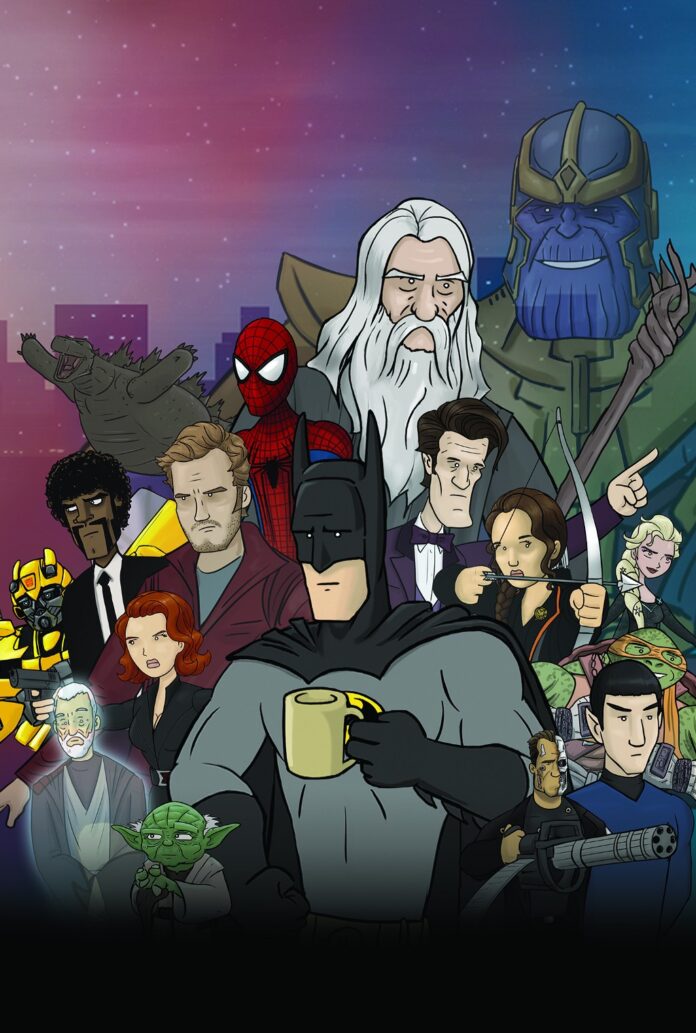
Over time, HISHE has developed their own comedic takes on several pop culture icons. The basic premise of the HISHE channel is parody, and the heroes who show up in the Super Café series of shorts have taken on a life of their own. The big blue boy scout isn’t so much the Man of Steel as he is a self-confident do-gooder with a slight phone addiction. On the other hand, the dark knight will take every opportunity to proudly confess, “I’m Batman.” He isn’t the campy embodiment of Adam West’s version of the character; he’s a self-absorbed and insecure twist on Christopher Nolan’s Batman. He’s proud of his identity and well-attached to the useful gadgets of his utility belt.

How It Should Have Ended’s Super Cafe series allows recurring parody characters to grow and develop over time.

Writing comedy and developing parodies involving famous characters on a recurring basis is no easy task. “The jokes have to work; otherwise we don’t use them,” says Tina. HISHE relies on their audience to know the characters, and this gives Tina an opportunity make jokes with the characters that extend beyond their movie incarnations. “Chris read a rumor on Reddit that Captain America might get killed in Civil War, so he appeared ghostlike in the background of our Amazing Spiderman cartoon.” There are deeper references as well, such as the recurrence of the other superheroes teasing Captain America about his theme song from the ‘60’s Captain America cartoon. Their anthology of jokes builds up over time and across cartoons as the characters develop.

Tina and Daniel love attending conventions like Comic-Con International: San Diego, where they can connect with fans and press alike.

Fan Interactions

Like most online content creators, HISHE observes their metrics through the tools built into YouTube. This allows them to evaluate how well they connect with their audience. “Those first 24 hours after we release are critical.” Tina says they still pay attention to total views, although many on YouTube are relying more on view time to evaluate the connection between their videos and their audience. Tina explains that with short format cartoons, views are just as, if not more, important than view time. One of the metrics that Tina feels is a significant indicator of a video’s success is its number of shares. “It’s one thing if somebody likes the video, but if they care enough to share it with others, that really means something.”

Another metric that’s important to HISHE is the number of subscribers they have, which currently sits above 6.5 million. It’s a number they work hard to maintain and grow. Half of their subscribers are outside of the United States. Tina explains how YouTube’s subtitle feature has allowed them to extend their international audience. “Subtitles have been great, where our fans can submit other languages. Within a week or two [of a release], we’ll have ten other languages [available].”

Tina explains how they were disappointed when YouTube changed the channel UI so comments were no longer posted by the subscribers on their front page. “It’s great to see the comments, especially immediately after a release.” However, she does find the top comment feature to be useful. She states, “it’s helpful to see what the audience is responding to and to see what they’re saying about it.” This helps the team to understand what their audience wants, and they use that information to help plan for future animations.

HISHE enjoys the interaction they have with their fans, through YouTube and in person. It’s something they wish they could have more of on other platforms but with such a small team, that produces so much work, the majority of their time is committed to producing HISHE shorts. However, the instant feedback they get from fans on YouTube is one of their greatest indicators of success. “Anytime it gets an overwhelming response, it’s a great feeling. Everytime. Meeting fans who have been around for a long time is amazing and flattering.”

Comic Con is an annual pilgrimage for HISHE where they meet fans and celebrities alike. They’re encouraged whenever they meet fans of their channel, especially those who have been there from the beginning. “We were at a conference once and met a fan who’d been following us for years. We all hung out together throughout the weekend and parted ways like we’d known each other for a long time.”

There are some fans who come as surprises. James Gunn has shared his approval of what HISHE did with “Guardians of the Galaxy,” and Damon Lindelof found their parody of “Prometheus” to be entertaining. Both are great acknowledgements, but there’s one fan who’s iconic. “Stan Lee says that he wishes he’d come up with the idea for HISHE, which was insanely flattering!” When asked, Tina confirms that Stan the Man is a fan of their work. He even voiced his own cameo in one of their Spiderman parodies.

HISHE works hard to satisfy their audience and keep people watching. That work was rewarded with this cake celebrating one billion views.

Beyond Parody

Movie parodies aren’t all that HISHE does. They’ve gone beyond and started to create their own animated shorts that stay within the realm of cinematic parodies called Hero Swap. It’s a what-if scenario proposition, such as putting Iron Man in Gladiator. There are behind the scenes videos, featuring speed painting screen captures from Photoshop as they develop their characters. It’s a steady stream of content. Tina emphasizes the importance of getting content out on a continual and consistent basis. HISHE has a dedicated and committed audience, and in turn, HISHE is committed to meeting their expectation of new animations on a weekly basis. In the online world, currents move swiftly, and the tide of an audience can turn, finding new sources of entertainment if their subscribed channels don’t deliver.

Fortunately, HISHE has found a way to provide for their audience.
One big move to provide more content was the launch of a new channel, HISHE Kids in January 2015. The goal of HISHE Kids is to provide entertainment for the whole family. An endearing series on the HISHE Kids channel is the Fixed Fairy Tales. It takes the basic HISHE premise and turns it on to familiar children’s stories such as “The Three Little Pigs.” The task of executing original animation on a weekly basis is a challenging task for a small team. Providing for multiple channels is something that would be difficult to achieve, even with Batman’s utility belt. Tina acknowledges the challenges a second channel presents and shares that the HISHE Kids channel is something they’d like to grow in 2017.

“We’d like to grow a lot in the next two years — work with some young college students and artists who want to learn and grow with us. We’d like to get some fresh ideas and fresh talent,” says Tina. One of their goals is to develop an original show that’s not a parody.

Parodies can be challenging, especially when they’re released for the entire world to consume. Copyright laws are established to protect intellectual property but there are stipulations that allow for fair use with parody. “Definitely, we have to know and understand the laws.” HISHE has released over 250 videos in their existence, with almost all containing a multitude of characters from other sources. Only twice have they been challenged legally for their use of parody. In one instance, it was an easier and better choice to change the content. But in their second challenge, they fought it and won. HISHE works with lawyers to make sure they are in the clear. “Our lawyer reviews everything to make sure they’re okay to defend our work. If they are, we go ahead with it.”

Parting Advice

When asked what advice she would give to any up and coming YouTuber, Tina said, “HISHE is rooted in friendships. When you’re passionate about it and pursue it with people you care about, all the better. You need encouragement and people in your life to lift you up and help you along the way.” That’s what makes the product better.

There are numerous ways for an online content creator to define success. Many are measurable, but true success is subjective; it’s something defined by those who work for it. If success is measured by doing what you love, with your friends, while being surrounded by a community you enjoy and care about, then How It Should Have Ended has achieved an incredible wealth of success.

https://medium.com/media/f210dfefce7b28ecbf301fd04179822c/href

kampungbet

situs bola

situs gacor

slot gacor hari ini

link gacor

toto slot

slot gacor

link slot

kampungbet

situs toto

situs toto

link gacor

slot gacor

kampungbet

link gacor

link gacor

kampungbet

slot gacor

slot gacor

slot gacor

slot gacor

judi bola

situs gacor/a>

Conspiracy Theory: How Online Video Became Our Most Honest Voice

YouTube: The Authentic Voice of the People

In these dark and confusing times, it can be hard to find the light of truth. Thankfully, the information age has given us a chance as a defacto voice of the people emerged, a place where everyone can share their authentic self. I’m talking, of course, about YouTube.

YouTube has given people a chance to know what is really going on, through content unfettered by the censorship of Big Media.

Long, long ago, people received their news from the television. Local stations broadcast local stories and the big networks told the news from a national perspective. At one point, this was done for the public good, because a well-informed populace is crucial to a healthy democracy. But things changed. As corporations bought up the networks, television news no longer operated for the benefit of the viewers; instead, it operated for the benefit of the corporation — the news had to make profit.

Newsrooms had to keep sponsors and maximize viewers. Instead of telling people what they needed to hear, the news began to report what people wanted to hear — a subtle but detrimental difference. Sensational stories became the aim. The corporations began shaping content to conform to their own social narrative. Tawdry celebrity gossip replaced investigative reporting on hard hitting issues, and journalists were replaced by commentators. The quality of the news declined rapidly. It wasn’t long before it offered no real information anymore, just ‘infotainment’. Television news became simple indoctrination.

The People were left with no compass in the wilderness, no candle in the night. We had no way of knowing what was really going on out in the world. Finally, when almost all hope had been lost — a light. The information age gave birth to YouTube: a new platform for authentic representation.

In this troubled era, the people yearn for reporting on real issues that affect us every day.

Anyone could create their own video, telling Truth with a capital T, without being beholden to corporate suits, network censors or the public image of advertisers. On YouTube, The Man has no stooges to silence news that could shake things up. You can report on trees changing color in your neighborhood, or you can dig deep to release an exposé on the effects of chemtrails on alien-human hybrid reptillians. The point is, it’s up to you.

Is there any platform that has such a widespread base of content creators? This range of voices is what makes YouTube authentic. Acting as an unfiltered mouthpiece for the people, the platform provides a direct view of daily life in the contemporary world. Historians of the future won’t care what the Action 5 News Team reports this evening; they’ll care about the vloggers who commented on what’s trending.

In this troubled era, the people yearn for reporting on real issues that affect us every day. They need the latest intel on what the reptilians are up to in order to prevent humanity from being enslaved. And there’s nowhere better than YouTube to get that kind of information.

Or maybe that’s just what The Man wants you to think.

YouTuber Magazine is a digital periodical. Subscribe here to have the next full issue delivered for free.

kampungbet

situs bola

situs gacor

slot gacor hari ini

link gacor

toto slot

slot gacor

link slot

kampungbet

situs toto

situs toto

link gacor

slot gacor

kampungbet

link gacor

link gacor

kampungbet

slot gacor

slot gacor

slot gacor

slot gacor

judi bola

situs gacor/a>

The Ethics of Clickbait

You’ll never believe how emotionally manipulative clickbait can be! Read on for a breakdown of the top 5 (or something) most annoying and arguably harmful ways that audiences can be exploited for that sweet, sweet click.

Scrolling through the front page of YouTube, it seems that my screen is covered with shiny, flashing, tantalizing fishing lures. Clickbait is most known in relation to journalism, but video creators aren’t above using attention-grabbing tactics to draw viewers in. The most pure form of clickbait can be found in those ads that pop up when someone (not me) tries to illegally stream a tv show.

Titillating pictures! Illuminati-level use of numbers! ALL CAPS!!!! These ads exist solely to draw your attention, and then you click on them, and then Putin gets your bank info and you still don’t know that one weird anti-aging trick a local mom discovered.

A Working Definition

Nilay Patel from The Verge defines clickbait as “a promise of value that isn’t met,” meaning the reader’s expectations are higher than what the media truly contains. Like a fishing lure, the clickbait uses a false premise to draw you in. I would add that clickbait entails an inherently negative experience, like being a fish with a hook through the jaw. Cats are popular, and there’s attention-grabbing videos involving cute cats having a nice time, but watching that will doubtlessly make you feel better than watching the following videos.

I’m not suggesting that content creators who employ clickbait techniques want to disembowel you for a fillet. Probably. I would argue that the videos I discuss do deliver on the promise of value, in that they are just as awkward or bigoted as the thumbnail says they are. In essence, clickbait is media that relies on some form of bias to grab attention, combined with more obvious ploys.

Headlines

A Brazilian study in 2015 found that articles with “an extreme sentiment” in the headline were clicked on more often than “neutral” articles. Specifically, articles containing the most “negative news” were read more than articles with positive or neutral news. This is why so many YouTube titles are EXTREMELY NEGATIVE! And usually in all capital letters, so even if the words themselves don’t intrigue you, the presentation will draw you in. Exclamation marks also serve as flags, and question marks automatically draw the reader in. The language itself tends to posit the creator as having valuable, life-saving knowledge that the reader doesn’t have access to, prompting interest while boosting the authority of the creator.

Thumbnails

Even before you read the title, you’ll see the thumbnail. There are often layers of emoji stickers and primary colors that typically fall under two categories: sex or fear.

A fun combo!

It’s very common to see women’s bodies displayed in the thumbnail, to attract a presumably male audience. The PG version of this would be using a popular female celebrity to draw attention to the video. The psychology is pretty simple here: she’s hot, click on the video to see her be hot.

Fear can present itself in blunt ways: scary clown, blood, got it.

But creators can also use institutionalized fear to attract viewers. There’s a whole genre of prank videos where white guys go out on the street and “pretend” to call black people the n-word (discussed further by Nathan Zed here). These videos rely on the assumption that black people are scary and violent, and the racism is further revealed by the creator’s tags.

Tags

Tags are used to make finding videos easier by relating them to other content and optimizing the search engine results. If I Google “cats dressed as cupcakes”, that is exactly what pops up. I’ve noticed two tactics heavily used by clickbait creators to maximize their reach. They tag their videos with the names of more popular subjects, like other creators (using Shane Dawson, specifically, is another tasty can of worms) or even news events.

Or, they tag their videos so that people who would be outraged by the content can find it more easily to argue about it and thus generate ad revenue. For instance, Nicole Arbour tags her rants with actual genres, alongside a clever variety of slurs. For her “Dear Black People” video, she tagged it as “Black (Ethnicity)” and “Caribbean (Region)”, so people who presumably have a positive interest in those subjects would find her video. She did the same with “Dear Fat People”, tagging the video as “Nutrition (Medical Specialty)”, an objective lie. Remember, even hate-watching generates ad revenue!

Of course, we all want people to watch the videos we make. But there’s a difference between honest content and content especially designed to manipulate. These tactics range from being irritating to actively harmful, and creators can definitely reach viewers without using cheap tricks. Put down the lure! Watch a cat video!

YouTuber Magazine is a digital periodical. Subscribe here to have the next full issue delivered for free.

kampungbet

situs bola

situs gacor

slot gacor hari ini

link gacor

toto slot

slot gacor

link slot

kampungbet

situs toto

situs toto

link gacor

slot gacor

kampungbet

link gacor

link gacor

kampungbet

slot gacor

slot gacor

slot gacor

slot gacor

judi bola

situs gacor/a>

Why Your YouTube Channel Needs an Offline Presence, Stat

Instead of relying solely on digital platforms for building brands, content creators need to expand beyond these online outlets into the real world if they hope to build a sustainable, profitable business and turn their video creation efforts into long-term careers.

In the last issue of YouTuber, editor Mike Wilhelm wrote about the problem of overreliance on YouTube ad revenue as a sole income stream. He pointed out how content creators should do their best to have audiences across multiple digital platforms.

However, I’d like to take this a step farther and argue that relying on any digital platform is a dangerous game to play in your video career — especially if you want it to be you full-time business. In fact, some of the best ways to earn a living as a content creator are actually offline.

To understand the issue with depending on digital platforms, let’s take a moment to look at Vine. Twitter’s recent announcement about shutting down or selling the six-second video platform came as quite the surprise to some video creators. But it shouldn’t have. When any business is struggling to pull in revenue, it either has to make some major changes or shut down, no matter who was relying on its platform or services.

This situation proves why relying only on digital platforms to maintain your creative career is unwise. You never know when a platform might implement more restrictive rules, be bought by another company or shut down entirely.

When you don’t own and operate your own platforms, you run the risk of losing the impact and presence of your brand, both online and off.

As such, looking outside the digital realm to improve your revenue is a wise business decision. This move will not only diversify your income options, but also improve the chances your business will remain stable should a digital platform decide to shutter its doors on you.

Here are four proven, timeless ways you can expand your brand beyond digital platforms:

Speaking Opportunities

While you can speak for free to build credibility and network within your chosen niche, paid speaking gigs are another way to pull in some extra cash while also establishing yourself as an expert. YouTube sex educator Laci Green, for example, is routinely hired by schools and universities to teach their students about safe sex, rape culture and gender issues.

Consulting/Services

Similar to speaking opportunities, you can build up your expertise in your industry by offering consulting or services to your own clients. If you are a content creator who focuses on creating how-to videos for car repairs and upgrades, you could market these same services to attract paying customers in real life.

Gumroad and other similar services can help you sell physical merchandise to help support your creative work.

Merchandising

Selling products related to your videos or brand is a relatively easy way to create another income stream with little effort and upkeep. Partner merchandising with live events and you have an even better opportunity to earn more money offline as a content creator.

Live events

Speaking of live events, no one’s holding you back from setting up an in-person appearance where you charge tickets for attendance or different levels of VIP experience. If your brand is strong, a good portion of your audience will likely pay to meet you in real life — really, it’s no wonder events like DigiTour and Fullscreen Live are becoming more prolific.

With all of these income streams, you’ll likely have some digital element involved. For example, you might go through a service like Gumroad or RedBubble to sell physical products. Or you may need to have some sort of website set up to show when you’ll be doing live events.

For the most part, however, these offline opportunities don’t depend on a digital platform you don’t own. Expanding beyond these platforms gives you more control over your business, your income and your career trajectory. And isn’t that ultimately what you want, anyway?

YouTuber Magazine is a digital periodical. Subscribe here to have the next full issue delivered for free.

kampungbet

situs bola

situs gacor

slot gacor hari ini

link gacor

toto slot

slot gacor

link slot

kampungbet

situs toto

situs toto

link gacor

slot gacor

kampungbet

link gacor

link gacor

kampungbet

slot gacor

slot gacor

slot gacor

slot gacor

judi bola

situs gacor/a>

Why YouTube?

We start YouTube channels for a variety of reasons: to share ideas, to become rich and famous, to entertain and to educate.

Still, YouTube has its share of problems. We’ve all struggled against an overly-aggressive copyright-detection algorithm. Without constant work cultivating a healthy community, our comments sections quickly devolve into dumpster fires. To top it off, when you compare YouTube to other video platforms like Facebook, Instagram or even the late, great Vine, growing a sizable audience on YouTube is a slow process that requires a lot more work. Why then is starting and maintaining a YouTube channel such an attractive idea?

First, YouTube is the only video platform that directly rewards content creators financially. There are a few other platforms that can be sources of passive income, most notably Twitch.tv, but none are as content-agnostic as YouTube. Earning money making video on any other platform involves becoming at least a part-time ad-sales representative — work most of us aren’t interested in doing.

The second reason YouTube remains the only? viable platform for many video creators is that it’s the only major platform known for its long-form video content that’s easy to access for both creators and viewers. This likely stems from YouTube’s unrivaled search functionality. Finding good video content using Faceboook’s search is a nightmare — never mind tracking down a specific video. Instagram is worse. Because of this distinct advantage, YouTube has established itself as the reliable resource for viewers.

Finally, YouTube is still in some ways the wild-west. The few rules it has are frequently broken and rarely enforced. That has its drawbacks in that it can foster a toxic community of trolls and cyberbullies, but it also means YouTube has virtually no barrier to entry. Any ambitious person with a smartphone can start a channel and achieve success.

YouTube is appealing because it offers money and eyeballs to anyone who can make a video, regardless of the nature of the content or its production quality. If you want to make tutorial videos about how to crush Dr. Pepper cans with a two by four, no one’s stopping you. On YouTube, good video content is easy to find, content creators are paid and anyone can participate. Until another platform can say the same, YouTube is our best and only choice.

YouTuber Magazine is a digital periodical. Subscribe here to have the next full issue delivered for free.
kampungbet

situs bola

link gacor

toto togel

situs toto

slot gacor hari ini

slot gacor

link gacor

slot gacor hari ini

link gacor

toto slot

slot gacor

slot gacor

slot gacor

bandunghoki

slot gacor

toto slot

situs toto

toto slot

slot gacor

situs toto

link gacor

Conspiracy Theory: Democratized Distribution or Dystopian Nightmare?

The Machiavellian Manipulation of Online Culture by our Corporate Overlords

Do you ever feel like you’re not getting the recognition you deserve for your videos? Does it seem as though, no matter how hard you try, you’re just not gaining any traction online? Perhaps you have been recognizing the signs that dark and sinister forces are conspiring to prevent you — clearly the next Orson Wells — from being discovered. If the struggle for online engagement often seems like you’re playing against a stacked deck, maybe, just maybe… you are.

Who are these faceless men in expensive suits who meet in dark, smoke filled rooms to decide your fate? Some would speculate it’s none other than those behind the scenes at YouTube.

When YouTube went live in 2005, it seemed like a utopian platform of democratized distribution for a new generation of content creators. And, for some, it was. But quickly, big corporate business interests found ways to market their products through this pinnacle of new media, and a dark age began.

On the exterior, we saw advertisements embedded anywhere they could fit. To some extent, this is expected; television and radio are both monetized through commercials that pay for the programming we enjoy. But once we scratch beneath the surface, we find much more ominous going-ons behind the digital curtain.

Time and time again, when we examine what’s trending on YouTube, it’s clear there’s some back room deals going on to promote certain, content that favors, shall we say… The Man?

On any given day, you’re likely to find the trending content on YouTube to be almost exclusively created by big studios. On the day this was written, we find Pokemon, The Late Show, The Tonight Show, NFL and Last Week Tonight. These shows and the networks and studios that produce them have controlled the airwaves and cable for years, if not decades! Why must our new, supposedly democratized distribution also be overrun by them?

I don’t go to YouTube to see content that was live on TV last night. I don’t have enough of a life to need that! I watch it live, like an adult with responsibilities and just a few hours of quiet time in the evening to blissfully zone out. I go to YouTube to see the weird stuff being made by independent creators. I go to see the work of the visionaries who don’t have access to the tools or distribution deals that would allow me to find them anywhere else.

So, why would the people at YouTube be hell-bent on selling out the little guy in favor of international corporate interests with deep pockets? What could big, multi-billion dollar businesses have to give a profit driven company that you or I can’t offer? What would be the draw of a titan of media production with a steady stream of new content and a large, paying, audience, over me, a relative nobody?

I’m not entirely sure, but I’m guessing the heads of the big studios learned a special handshake while in Skull and Bones with Mr. YouTube.

YouTuber Magazine is a digital periodical. Subscribe here to have the next full issue delivered for free.

kampungbet

situs bola

link gacor

toto togel

situs toto

slot gacor hari ini

slot gacor

link gacor

slot gacor hari ini

link gacor

toto slot

slot gacor

slot gacor

slot gacor

bandunghoki

slot gacor

toto slot

situs toto

toto slot

slot gacor

situs toto

link gacor

Advertisement
Advertisement
communal
communal